
Home / Review
ArmorSim Review
Deep ballistics physics and versatile sandbox modes buried under a brutal interface.

Contents
ArmorSim: 63% positive from 224 Steam reviews, 24-hour peak of 17 players, priced at $14.88, SteamGame.ai potential score 53/100 (data as of 2026-11-22). Source: SteamGame.ai (Find the next hit before it hits.)
Pros
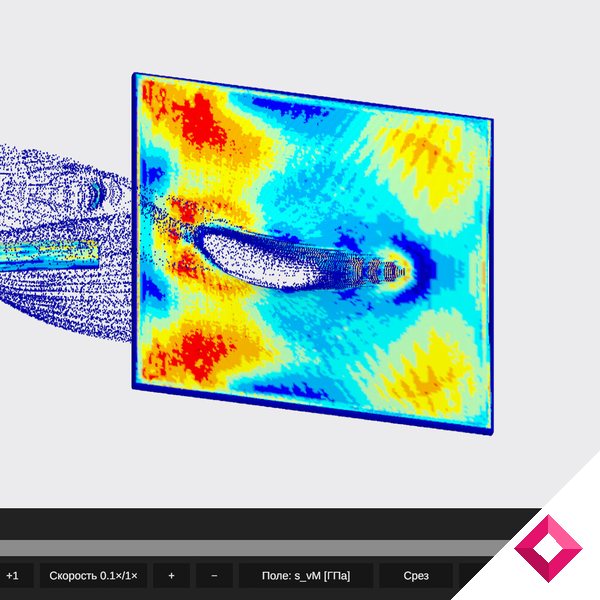
- Detailed terminal-ballistics physics and plate-bulging simulations without engineering-software complexity
- Multiple 2D, 3D, radar, and aerodynamics modes that run smoothly on low-spec PCs in simpler views
- Frequent Early Access updates steadily expanding modes and fixing initial issues
Cons
- Confusing, tutorial-free interface with hidden error messages and poor 4K scaling
- Incomplete English localization with residual Russian text and no Simplified Chinese support
- Frequent crashes in complex modes, inaccurate reactive armor and HEAT behavior, and a steep asking price
Slamming Soviet, German, and American service rounds into custom-built armor plates usually requires professional engineering software, and ArmorSim brings that terminal-ballistics testing into an accessible Early Access sandbox. Across 220 Steam reviews, the simulator currently holds a Mixed reception at 63% positive. Its appeal rests on physics calculations that approach dedicated engineering tools alongside a surprising variety of 2D, 3D, radar, and aerodynamics modes. Yet a clumsy and tutorial-free interface, incomplete Russian-to-English localization, frequent crashes, and an asking price that many buyers consider too steep for its current state hold the experience back.
Steel, Angles, and Terminal Ballistics
Building custom armor arrays and firing historical penetrators at them delivers a gratifying laboratory for military hardware enthusiasts. You configure target plates by selecting materials, thicknesses, inclination angles, multi-layer layouts, and reactive armor, then pick or customize service rounds to watch projectile erosion, plate bulging, breaches, and fragmentation unfold through physics solvers. Many players praise how close the Super Simulation mode comes to commercial engineering applications. One reviewer noted that the plate-bulging behavior fooled a friend into thinking the footage came from ANSYS, while another called it the most approachable way to experiment with armor penetration without paying for ANSYS LS-DYNA subscriptions. Weapon enthusiasts use these tools to recreate real-world tank armor layouts from vehicles like the King Tiger, Sherman, and KV-1 to test which projectiles they can stop. Even so, the physics engine has clear blind spots. Several players report that HEAT projectiles, shaped charges, and active or reactive armor systems fail to behave realistically, while other feedback points out simplistic yellow-and-black heat maps in certain views, basic impact particles, and the absence of full-plate vibration modeling.
yeah i love this thing, even though i have a potato pc/laptop. i only do plane mode though. id like to say that this is difficult to learn unless you use the simple modes, but its still very fun and accurate
A Suite of Modes and Performance Quirks
Beyond standard armor penetration tests, the package bundles several distinct simulators that scale across different hardware configurations, though technical instability frequently disrupts heavier tests. Several players highlight that ArmorSim includes 2D, super-detailed 2D, 3D, and super-detailed 3D ballistics modes alongside an aircraft and aerodynamics sandbox, a radar simulator, and a deathmatch mode. Users running low-spec laptops report that the simpler 2D, plane, and sandbox modes perform smoothly without lag. Pushing into the more demanding solvers, however, exposes serious technical flaws. Several players experience frequent crashes and severe frame drops, including framerate plunges into single digits when clicking the Body tab in 2D mode, crashes in Advanced mode when creating oversized projectiles, and Super Simulation grinding to a halt after adding just a couple of extra armor plates. One reviewer also reported a crash severe enough to break their Nvidia GPU sensor readout even after a system reboot.

Clumsy Menus and Lingering Language Barriers
Navigating between those sandboxes requires wrestling with a frustrating user interface and unfinished localization, even as routine updates chip away at launch-day flaws. Many players criticize the menus for lacking any tutorial or explanation of technical parameters, leaving newcomers to guess what individual buttons and values do. Screen elements overlap and hide critical error messages, tiny English text fails to scale properly on 4K displays in 3D mode, and saving a Super Simulation video requires entering a separate editor mode. Language barriers compound the confusion, as many reviewers complain that critical buttons remain in untranslated Russian, while Chinese players note the lack of Simplified Chinese support. On the bright side, several players point out that frequent updates since launch, including a major 3.0 patch, have resolved many early translation bugs, smoothed out the 2D mode, and added new modes every month. Still, reviews posted in late October and November confirm that rough menus and unexplained controls continue to frustrate newcomers.
That uneven polish splits the community sharply over whether the Early Access build justifies its current price tag. Many players argue that the asking price is far too high for an unfinished, bug-prone sandbox, advising prospective buyers to wait for a steep discount. Even a reviewer who logged 48.6 hours experimenting with the tools recommended holding off because too many features malfunctioned. Conversely, several dedicated tank enthusiasts and vehicle-combat fans insist they got their money's worth, happily spending dozens of hours testing material interactions and custom rounds while treating the purchase as support for ongoing development.
It's alright. Buggy as hell, unintuitive, poorly translated and overpriced though.
This review is based on 44 Steam player reviews and store data. See all reviews on Steam →
Quick answers
Why does ArmorSim consume so much hard drive space after long testing sessions?
One post-launch reviewer who spent 49.5 hours running simulations warns that the software automatically saves session recordings into your hidden Windows AppData folder, accumulating around 130 GB of files after a full day of testing that you must locate and delete manually.
How long does it take to figure out the controls without a built-in tutorial?
Several players note a steep initial learning curve due to the lack of guides and parameter explanations. One reviewer in November advises expecting to spend roughly an hour combing through the interface just to locate features and learn how to save Super Simulation videos, while another player notes that sticking to simpler options like plane mode makes learning much easier.
By the NumbersUpdated 2026-11-22. Data updates on a daily schedule.
- Potential score
- 53 list metric, not a quality score
- Positive (all languages)
- 63% Mixed
- Total reviews (all languages)
- 224
- New reviews/day (7d)
- 1
- Peak players (24h)
- 17
- Price
- $14.88
- Release date
- Sep 16, 2026
- Developer
- Timerlan Galimov
- Publisher
- Galimov Dynamics
- Est. sales
- 6,720~13.4K rough estimate from review count
Source: public Steam store pages and player reviews. Review counts, positive share and daily new reviews cover all languages; the player peak is the highest count in the last 24 hours; estimated sales are a rough estimate based on review count, for reference only. Updated 2026-11-22; data updates on a daily schedule. Methodology
Daily New Reviews (all languages)
Is interest rising or fading?
Developer View
- Developer
- Timerlan Galimov
- Publisher
- Galimov Dynamics
- Developer's games on Steam
- 1 incl. this one; matched by developer name, may be off
- Early Access
- In Early Access
The store page has no AI-generated content disclosure.
More reviews

Mayday: The Survival Island Review

Groundwork Simulator Review